Thursday, 26 April 2018

Are Smartphone Camera Lenses Worth Buying?

It gets said a lot: “The best camera is the one you have with you.” That has never rang truer than it does today, in the age of smartphone photography. But while smartphones are more convenient to carry around, DSLRs are still way ahead in versatility due to the wide range of lenses available.

That’s why if you want to avoid lugging around a heavy DSLR but want to get more out of your phone’s camera, you might try adding a smartphone lens to your arsenal.

Between the latest Samsung, Google, and Apple phones, there are some excellent smartphone cameras available to shutterbugs. And it’s pretty much a guarantee that the next time you upgrade, the camera will be even better. So why should you consider adding a lens?

You may want to carry less gear, improve the quality of your photos, or push the limits of your phone. Or maybe you’re on the hunt for gifts for the photographer in your life. Whatever the reason, here’s everything you need to know about smartphone camera lenses.

Your Smartphone Camera Has Limitations

One of the key reasons you should be considering a smartphone camera lens is that there are certain limitations your phone just can’t get over, no matter how hard it tries:

  • When it comes to hardware, your phone has a tiny lens, and it’s only going to let in so much light.
  • The biggest advance in phone cameras isn’t coming through optics. It’s being brought to you by software. Computational photography uses software to process your phone’s images and exceed the native capabilities of the optics. You can see this in action on your phone when you take a panorama photo, use HDR, or use portrait mode on your phone. And of course, these features aren’t perfect.
  • Most phones only have digital zoom, and if you take your photography seriously, you’ll never use it. Digital zoom doesn’t tinker with your camera’s optics, instead it just scales up the picture. You’ll end up with a pixelated image that isn’t that different had you taken the photo without zoom and just cropped it.

How to Get Past These Limitations

There are several types of smartphone camera lenses that can help you get past your phone’s software and hardware limitations.

  • Telephoto: Rather than rely on your phone’s digital zoom feature, opt for a telephoto lens instead and catch those moments from a distance but with a crisp, clean photo.
  • Wide Angle: A jack of all trades, a wide angle lens will come in handy with street or landscape photography, is great for food photography, and more.
  • Macro: Your phone might have a macro option in the camera, but a macro lens will give you far more detail or texture.
  • Fisheye: You can also get creative if you go for something like a fisheye lens. There are apps that claim to offer that kind of functionality, but let’s be honest, they’re just manipulations that will never look true to an actual fisheye lens.

Real-Life Lens Comparisons

This is all good and well, but what about an actual comparison of photos with and without a smartphone lens?

Just to give you an idea of what a lens can do, here are some real-life comparisons using the Google Pixel 2 XL, which is a smartphone with a great camera, with a Moment Wide Angle lens attached. Moment claims that this lens doubles your phone’s native field of view.

Since the Google Pixel 2 XL has a lens which is roughly the equivalent of a 26mm lens, the wide angle smartphone lens pushes that to the equivalent of 18mm, giving you a far wider shot.

Street Photography

I’m going to show you three photos that will help illustrate how helpful one of these lenses can be in your street photography.

The first photo is this pleasant exterior shot of the National Gallery of Art in Washington, DC. The photo was was taken with the phone’s camera. It’s a straightforward shot and the camera does a fantastic job of rendering the scene.

street photography no lens

Let’s look at the second photo—taken from exactly the same spot—but this time with the the wide angle lens attached.

street photography with lens

That’s a pretty big difference. I managed to fit almost the entire side of the building into the frame, and more importantly, the image quality hasn’t suffered.

I can hear some of you in the back saying: big deal, why don’t you just back up and get the same shot without having to shell out for another gadget. Good question. So let’s do that.

Here’s the same field of view, and the same portion of the building captured without the aid of the 18mm lens.

street photography comparison

To get this shot, I had to back all the way across the street. Now I’ve got the same portions of the building, but I’ve also introduced a bunch of cars, a streetlamp, people I don’t know, and some less photogenic trees.

I’ve sacrificed a lot of compositional cleanliness and control getting this shot. Focusing with one’s feet isn’t always the best answer.

Food Photography

If you’re trying to to get a flat lay photo of your meal at a restaurant you’re going to have to get up over the table. And if you’re not a fan of standing up on a restaurant chair, attaching a wide angle lens to your phone will get you much closer to your goal.

Trying to capture a flat lay photo by holding your phone above the table, without standing up, will get you something like this (I was also contending with a low hanging lamp):

flat lay photo

Holding the phone in the exact same spot, with the addition of the lens, gets you this:

flat lay photo

As you can see, shooting with a smartphone lens helped me pack in much more detail without having to disrupt everyone else’s meal in order to get the shot.

Should You Buy a Smartphone Camera Lens?

So, do you need to buy a third-party lens to improve your smartphone photography? For most users, no.

However, having a smartphone camera lens in your arsenal really does open up your smartphone photography to a whole new world of possibilities.

If you want to make money with smartphone photography or improve your photos of food—or you’re a professional photographer looking to diversify your options—then a smartphone camera lens is definitely a worthy purchase.


from MakeUseOf https://ift.tt/2r2vw49
via IFTTT

How Does Election Hacking Work? Everything Explained in Simple Terms

The fallout from the 2016 presidential election continues to dominate the news. If you flick to your favorite news channel, there’s a strong chance at least something to do with the election is still making headlines.

And for a good reason. Whatever side of the political spectrum you hail from, there’s a lot to talk about.

One of the major sticking points is that of election hacking. Allegations of election hacking and tampering continue to swirl, and with more elections looming near, this combustible topic is going to feature increasingly.

However, election hacking is a broad term. With one eye on the midterms and another on the future, let’s try and understand exactly what election hacking is.

What Is Election Hacking?

Election hacking has a broad set of definitions, but you can boil it down to one central concept: manipulation of the voting process in favor of a candidate or political party.

Election hacking is also known as electoral fraud. At other times critics refer to it as vote rigging or electoral interference. But the objective is always the same—to directly influence the outcome of a vote.

One challenge facing voters is pinning down the effects of election hacking. Voters encounter difficulty because it isn’t usually a single observable issue taking place. In many cases, the manipulation is subtle, plays out over a lengthy period, and isn’t apparent until after the election results (but not all the time).

Around the world, numerous totalitarian states feature only name on the ballot: that of the existing leader or party, or parties subservient to the ruling party. This happens in countries like China, North Korea, Cuba, and Vietnam (there are several more, too). These are single-party dictatorships, however, and differ somewhat from rigged voting situations.

There are countless rigged election examples. For instance, the Ugandan general election of 2006, the Kenyan presidential election of 2007, the Romanian presidential election of 2014, the Syrian presidential election of 2014, and hundreds more all fit this category.

What Election Hacking Looks Like in Practice

Despite the many examples of electoral interference around the globe, election hacking boils down to just three major, coverall categories. Why? Because together, these three categories form a cohesive strategy for election hacking.

1. Manipulate the Voters Before the Election

The first strategy is to manipulate the voters before they hit the polling booths. Manipulating voters before an election is itself multifaceted, but there are prominent recent examples for you to examine.

The post-2016 presidential election analysis from various government agencies made it clear that Russia had run a “messaging strategy that blends covert intelligence operations—such as cyber activity—with overt efforts by Russian Government agencies, state-funded media, third-party intermediaries, and paid social media users or ‘trolls.'”

In early November 2017, Congress released a series of Russian-backed Facebook ads that targeted voters of specific demographics. The advertisements promote divisive, emotional topics designed to begin online arguments (some of which spilled out into public). Other revelations saw Russian-run Facebook pages uniting different political pages under unique hashtags to raise awareness.

“Fake news” plays a significant part in voter influence, as does social media in the distribution of the false stories. The severity of fake news varies. At times, fake news is a regular news report that has its truth economically twisted to suit the goal of the news outlet and their political choices.

However, at other times, fake news is outright lies spread throughout social media (sometimes using the aforementioned targeted advertising to hit key demographics that are more likely to share the fake media and thus increase its reach).

Facebook isn’t the only place where voters were unduly influenced by other nations. Twitter is also rife with fake bot accounts that only retweet specific hashtags. Reddit has well-known problems with downvote and upvote brigading, forcing dissenting voices toward the bottom of the conversation.

Fake news regularly appears in national newspapers, making bold, false allegations that target specific demographics or make sweeping, generalized statements. But when proven false, the newspaper prints a minute apology buried in the middle of an edition months down the line.

Another common voter manipulation tactic is to split the opposition support, then manufacture conflict between those parties. The US political system has only two major parties that will realistically win control of the three branches. Thus, splitting voters within parties isn’t a common tactic. However, in the UK, this tactic becomes more potent due to the overlap of many political parties.

2. Manipulate the Votes and Machines

Directly after the 2016 presidential election, voters were left wondering if nefarious individuals tampered with their voting machines. At the time, the Department of Homeland Security had found no evidence.

However, there were attacks against at least one US voting software supplier, while a leaked NSA document confirmed a breach with a Florida-based voting-equipment vendor. A Bloomberg report in 2017 alleges “Russian hackers hit systems in a total of 39 states,” drastically increasing the scope of potential interference.

A direct attack on the voting machines seems unlikely; outrageous, even. They are a bastion of democracy, after all. But hackers have repeatedly shown just how easy it is to exploit a voting machine. At the enormous DEFCON cybersecurity convention, it took hackers less than two hours to hack a US voting machine. The DEFCON organizers pooled 30 voting machines from a variety of manufacturers, none of which remained secure.

One wireless hack exploited a 14-year-old vulnerability in unpatched Windows XP machines. Using the exploit, Danish security researcher Carsten Schürmann could change the machine vote tally from anywhere on the planet.

Despite what both major US political party supporters yell, there is still no evidence that there was direct voting machine manipulation affecting the outcome of the 2016 US presidential election. But “[w]ithout question, our voting systems are weak and susceptible,” says Jake Braun, CEO of security consulting firm Cambridge Global Advisors. “Thanks to the contributions of the hacker community today, we’ve uncovered even more about exactly how.”

3. Manipulate the Infrastructure

Finally, consider how manipulating the infrastructure around an election also plays a part in the outcome. Causing mass-disruption to citizens attempting to cast a vote is another way to hack an election. Disturbing the election process on the day of, or day before, can sway numbers.

Disruption levels vary, as you might imagine. An extreme example is the 1984 Rajneeshee attack. A religious cult poisoned over 700 Oregonians with salmonella to stop them voting in county elections, almost killing several in the process. At the same time, the cult registered thousands of homeless people to vote, promising them food in return. This level of disruption to cause “natural” voter fraud is rare. Also, it is difficult to contain, as the cult quickly realized.

However, widespread disruption doesn’t require poisoning or busloads of homeless people. A hacker with access to a voter database could delete or corrupt voter logs. Sounds outlandish? This exact hack took place at the aforementioned DEFCON conference. As you have already seen, Russian hackers hit voting systems in 39 states, so it isn’t entirely out of the question.

Another infrastructure disruption tactic is a powerful DDoS to take political information offline at critical moments. A Distributed Denial of Service (DDoS) attack is easy to organize, as well as cheap and very effective. Political sites can be forced offline under the strain of a DDoS attack.

So while mobilizing individuals or even thousands of people to commit voter fraud through disruption is difficult, using digital systems is not.

Election Hacking Is Broad

These three categories cover the majority of the electoral tampering spectrum. Unfortunately, it is broad.

But in democratic countries with a strong history of stable voting (as well as the peaceful transition of power), claims of electoral fraud are usually without basis.

The problem with such assertions is the resulting reactions harm those that already struggle to vote, in turn creating another form of election hacking (this falls under section one and three, by the way).

Image Credit: lisafx/Depositphotos


from MakeUseOf https://ift.tt/2FiPlt4
via IFTTT

4 Ways to Find the Best Google Sheets Templates

When it comes to creating a spreadsheet, one of the best ways to start is with a template. Whether it’s for a family budget, company invoice, or academic calendar, a template gives you the foundation for your data.

If you use Microsoft Excel, then you probably already know that websites with templates can be easy to find. But what about Google Sheets? The results appear limited when you do a Google search. However, you actually have more options than you probably realize.

1. Check Out the Built-In Templates

Before heading out for a web search, take a look at the handy built-in templates that Google Sheets offers.

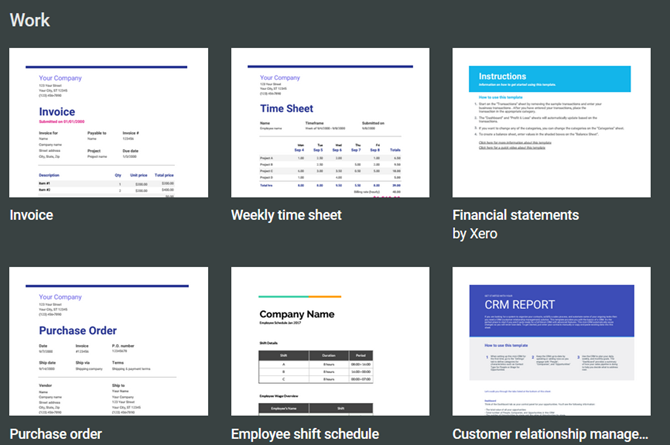
Open the Google Sheets website and sign into your account. At the top, you will see the Template Gallery with arrows next to it which allow you to view all templates. You can then browse by the categories for Work, Personal, Project Management, and Education. While the categories make browsing simple, you can use any template that has what you need.

Google Sheets Templates

Click the template you want, and it will pop right into its own browser tab. You will notice that if the template contains more than one tab, has built-in formulas, or includes formatted fields, everything will be there for you to begin.

Then, just start adding your own data. Keep in mind that all areas of the template can be edited for full flexibility and all changes are saved automatically to Google Drive for convenience.

2. Download More Templates With Add-Ons

If the built-in templates don’t give you what you want or if you just want more options, try these Google Sheets add-ons.

Template Gallery

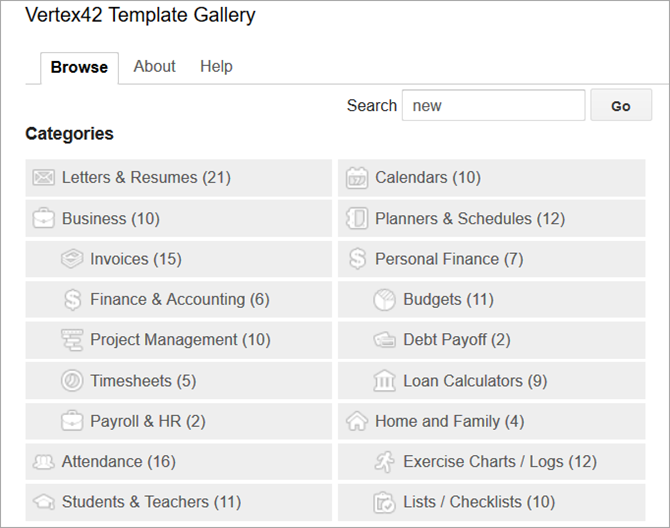
Vertex42 for Google Sheets Templates

From Vertex42, a popular template website, this add-on gives you a host of options. After you install it, open a spreadsheet, any spreadsheet, and then click Add-ons from the top menu. Choose Template Gallery > Browse Templates. You will then see a nice variety of templates within several different categories along with a count of how many templates are in each one.

Click on a template, hit the Copy to Google Drive button, and then click Open File. The template will then open in a new browser tab for you to get started.

Template Vault

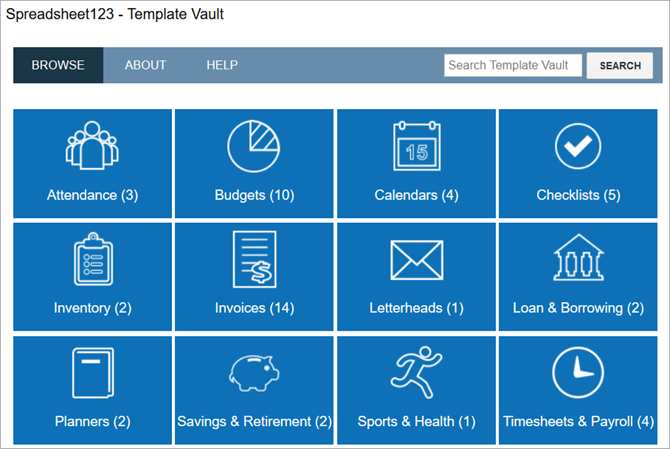
Spreadsheet123 for Google Sheets Templates

From Spreadsheet123, another great template site, this add-on works just like the Template Gallery. Install it and then open a spreadsheet and click Add-ons to access it. Select Template Vault > Browse Templates.

You will then see a window pop open with a dozen categories. The template options are bit more limited with this add-on compared to the one above. However, you still get a good selection and you can view templates for Google Docs if you use it as well.

Again, click on a template, hit the Copy to Google Drive button, and then click Open File. Then get ready to add your data when the template opens in a new browser tab.

Just like with the templates built into Google Sheets, these will carry over all tabs, formulas, and formatting for you.

3. Use Excel Templates in Google Sheets

Maybe when you are searching for Google Sheets templates, you come across those for Microsoft Excel and just continue your search. But you can open and use Excel templates in Sheets. It’s super easy.

If you do not have a desktop application to download a template you find online, just save it to your computer or Google Drive. And if you do happen to have a spreadsheet template saved already, then you are one step ahead.

Next, head to the Google Sheets website and sign in. Open a blank spreadsheet by clicking the plus sign labeled Blank at the top of the Template Gallery. Next, click File from the menu and then Open. In the popup window, you have a couple of options for opening your template file.

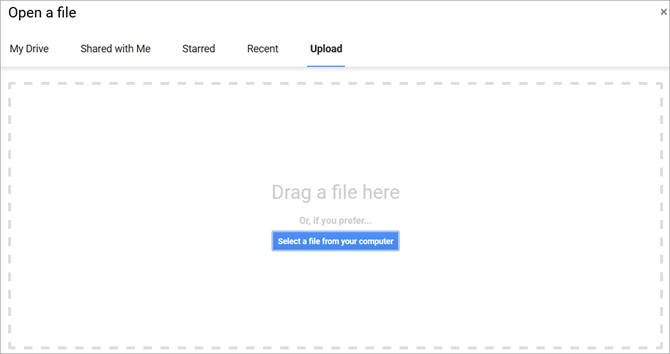
Google Sheets Open File

If you saved the template to your computer, click the Upload tab. You can then drag the file from its folder onto the window or click the Select a file from your computer button to browse for its location.

If you saved the template to Google Drive, click the My Drive tab. Then, navigate to the file and select it.

Depending on your internet connection, it should only take seconds for your file to load. When it opens, you can start adding your data. You might find the perfect template because Excel has a better range of templates to offer.

4. Browse Third-Party Templates

To help in your search for even more Google Sheets templates, check out and bookmark these great sites.

  • Smartsheet offers a nice collection of Google Sheets templates for free as well as those for Microsoft Excel. With options like Gantt charts, expense reports, timesheets, and calendars, there are many free templates to pick from.
  • Template.net also has a good variety of free templates for Google Sheets. Note that the ones with the orange Download buttons will take you to another site where there may be a fee for the template. The ones with the green Download buttons are available immediately at no charge.
  • Vertex42 and Spreadsheet123 are the creators of the Google Sheets add-ons shown earlier. They both have websites you can browse if you prefer not to try the add-ons. Just click on the Excel Templates button from the top on either site. Some templates are available to open right in Google Sheets while others are designated as Excel files. Just remember, you can still use an Excel template in Google Sheets by following the steps above.

Make a Date With Your Google Sheets Data

Now that you know of the various ways you can obtain and work with Google Sheets templates, it’s time to get to it. And, before you go, take this idea from Excel and customize your own template. They can really save you a lot of time.


from MakeUseOf https://ift.tt/2I2JsTF
via IFTTT

Cryptojackers on Google Play: How to Avoid Being a Victim to This Malware

Security researchers at Kaspersky have identified various apps and games in the Google Play store that have a secret function: they’re using your Android device’s processor to mine cryptocurrencies.

Worried that your phone’s recent slowdown might be because it’s getting old? Well, hold that upgrade: it could be down to Android cryptojacking. Here’s what’s going on, and what you can do to stop it.

Cryptomining Malware on Android

In April 2018, Kaspersky revealed that it had discovered a cryptomining campaign on Google Play, and advised Google of the details. In short, this meant that a bunch of apps and games had been cryptojacking users. This is using their phone or tablet’s CPU to mine cryptocurrencies, usually Monero.

Currencies

To find out more about this, I spoke to Francis Dinha. As the CEO and co-founder of OpenVPN (the open-source VPN protocol with a focus on security), Dinha is a respected cyber security voice.

Describing an active campaign of cryptojacking (which Dinha also refers to as “drive-by mining”), he explained that miners are “being secretly embedded in mainly gaming and sports streaming apps […] and targeting millions of Android device users.” There is also news of other apps hiding cryptojacking scripts, including some that claim to offer VPN functionality.

Several approaches are used by the scammers behind these cryptojacking campaigns. Dinha told me that “a few off-the-shelf Monero mining tools have come into circulation, one of which is Coinhive. These tools accomplish Crypto-jacking by hiding a Coinhive JavaScript miner within the app or on a normal website.”

When the JavaScript code runs, it then utilizes your Android device’s CPU to mine Monero for the app’s developers.

Note: Even websites can run Coinhive without your knowledge. We’ve previously looked at websites that use your CPU for cryptocurrency mining.

The Cryptojacking Risk to Android Users

As Dinha notes, “The apps appear to have legitimate functionality, yet the real goal is to provide CPU power to mine a cryptocurrency called Monero.” Getting these apps listed on Google Play appears to have been based on producing apps that run as per the description, and hiding the cryptojacking code within the app.

Worryingly, Google Play’s checks are not in-depth enough to spot cryptominers. We’ve already seen how copycat apps manage to get through the screening process.

Having this sort of software on your smartphone is a bit of a risk to system stability. It might also reduce the lifespan of your device. “Draining a device CPU could lead to super slow functionality,” says Dinh. “Long-term overheating could ultimately damage the device.”

It’s difficult to tell if an app or game that you have installed has a cryptojacking miner hidden within. However, in some cases you can tell if your device has been subjugated to the cryptomining shenanigans of a scammer. Your phone may slow, and your web browser may open popup windows.

However, Dinha isn’t confident that it is easy to spot cryptojacking:

“Some of these malicious programs are quite advanced and are able to monitor CPU usage and even the temperature of the device to avoid causing the user to suspect the app.”

How Can You Stop Hidden Cryptominers?

Although Google has addressed the issue, and begun removing suspicious apps from the Play Store, there is every chance that other apps (perhaps by other scammers) might repeat this.

Francis Dinha gives us three basic rules for protecting against this malware:

  1. Be wary of free applications.
  2. Don’t install apps from untrusted sources.
  3. Keep your device updated.

It is worth checking your device CPU’s performance, regardless of any steps taken by the scammers to hide activity. Dinha advises users to “go to task manager settings and check to see if the device CPU performance is unusually high. If so […] shut down or close running apps. If there is no change in performance… suspect a malicious malware.”

We should underline this. Using an Android device to mine cryptocurrency can cause considerable damage to the phone. Some phones might be totally unsuitable, and lock up when the mining script is launched. Others might appear to manage the extra load, but run hotter than usual.

As a rule of thumb, your smartphone shouldn’t be running consistently hot. This is why smartphone cameras shut off on hot days when in video mode. Basically, hot phones are a problem!

Watch That Battery Usage!

There are other steps to take if you suspect cryptojacking, or just want to check. Android makes it simple to determine the battery usage of particular apps, which can provide you with clues. Avoid apps that claim to boost your battery, though, as they’re mostly useless and could even be mining Monero on your phone themselves.

Meanwhile, you should always be confident of the developer’s reputation before you install an app. Big-name developers, and those with a good history of strong apps, should be trustworthy. No-name developers are more likely to sneak cryptojacking into their apps.

Finally, consider a mobile security tool. These can detect miners, including those sneaky ones that don’t overheat your phone.

Android Cryptojacking: Don’t Get Jacked!

Cryptojacking is a concerning new cybersecurity development, and one that requires vigilance. When there is an opportunity to make money, scammers will take it. They’ll use any means at their disposal, even if that means your mobile device.

So, bear in mind Dinha’s recommendations, and stay alert for drive-by-mining scripts with a few important guidelines:

  1. Be wary of free applications.
  2. Avoid untrusted third-party marketplaces.
  3. Rely on trusted app publishers.
  4. Always update your device.
  5. Watch CPU performance.
  6. Monitor your phone’s temperature.
  7. Install reputable security software on Android.

For help with antivirus tools, see our list of the best Android apps, which includes a section on security apps. Meanwhile, be aware that cryptojacking is a risk on desktops as well as Android.


from MakeUseOf https://ift.tt/2KfCnzT
via IFTTT

AmpliFi Teleport Makes Your Own Secure VPN (Review and Giveaway)